Initially introduced at Harvard University, Facebook was essentially (although not exclusively) a way for students to attach names to faces. Expanding to high schools and then large corporations, it has developed into the gigantic social network service (definition found here) it is today.

I have been a member of the site since 2006, when it was first opened to anyone 13 and older with a valid e-mail address. At this time Facebook lived in the shadow of MySpace and I was lucky to find one or two people I knew with personal profiles. The rapid increase in popularity and growth of the network has brought to the site friends, colleagues, former classmates (and their parents). Someone I know joins almost every day. New websites, applications, and online tools come and go but so far Facebook has been savvy regarding trends and proactive in updating their service. Love it, or hate it, Facebook is huge.
Promoting your business or organization with a Public Profile Page
Local businesses are finding Facebook useful for word-of-mouth advertising with a Page or, sometimes called a Public Profile. Customers can become fans by choosing to “Like” your organization and interact with your business in nearly the same way they would interact with their friends on Facebook. In addition, their interactions with your page are visible to the Friends they’ve added, helping to spread the word about your business. Facebook describes the process this way:
When your fans interact with your Facebook Page, stories linking to your Page can go to their friends via News Feed. As these friends interact with your Page, News Feed keeps driving word-of-mouth to a wider circle of friends.
How Do Fans Interact?
As the primary method of interaction on Facebook, the Wall is an important feature of any profile. On your page, within a box that encourages you to write “What’s on your mind” you can add any kind of broadcast message regarding your business – these can include links (be sure to use http://), upcoming events, fun facts, or even questions. These are added to your wall. Fans (if you allow them), may also write something on your wall, add their thoughts to a discussion, ‘like’ or comment on a photo or note you’ve added.
Activity that appears on your wall will be seen by Fans via their News Feed. A listing of the latest activities and actions taken on the network, the News Feed is the primary method a user employs to keep track of the activity of his friends and now, also the entities of which he is a fan. Likewise when a fan adds or interacts with content on your Page, his activity appears as an action/activity visible to his friends in their News Feed.
Therefore, the more interaction between you and your Fans, the better. If you don’t feel you can do it alone, you can add administrators to help you simply by sending an invitation from Facebook via email.
How Public Is Public?
It is imperative to remember that Public Profiles are exactly that…. public! These pages do not have the extensive privacy settings that Personal Profiles do. Therefore, do not not add or show anything in the content of this page that you would not want broadcast to anyone/everyone on the internet! Items posted on your Wall can be removed and you do have some control over what Facebook users can do on your page. Most users will need to be logged in with a personal profile account and be a fan or ‘like’ your page to comment and participate in other ways.
How to Set Up Your Public Profile Page
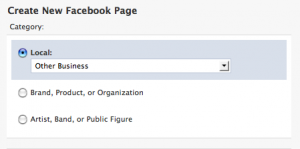 Signing up is easy. Visit http://www.facebook.com/pages/create.php and fill out the appropriate information. Most dance studios would be considered a Local Business, however there is not a specific category for dance so choose what you think is best, place your business’s name in the appropriate field, and submit. You need not have a Facebook account to set up a Page, however it can be a bonus in learning how to use and navigate the network.
Note: You are required to legitimately fit under one of these categories to create a page. Do not create a page about a subject related to dance (Facebook does offer Groups and Community pages for this). And do not create a page for a brand that you have no association with… it’s a big no-no.
At first, your new Facebook Page will appear rather blank. Prompts, however, will help you to get started. You might begin with uploading a picture (this will be your avatar throughout the site so you may want to choose a logo – you can always change it later). You can also click Edit Information and enter the basic details about your business. Clicking on Edit Page (under your photo) offers additional settings options.
Pages may feature and display Discussion Boards, Events, Links, Notes, Photos, and Reviews, as well as other applications. Many of these can be added or removed as a tab at the top of your page. For example, if you think posted photos may be important to the promotion of your studio, creating a Photos tab is a good way to feature them.
Interactive Business Card
Like an interactive business card, Pages on Facebook represent your business, organization, or brand. They are visible in web searches to those not on Facebook. And, within Facebook, pages offer a chance for you to directly interact and share news, info, links, events, and more with your fans and spread the word about your classes or programs to others on this vast social network.
Dance Advantage has a public page – I invite you to view it, see how I utilize it, and Like it!
Should you desire to take this a step further and have the budget to do so, Facebook also offers advertising opportunities for Pages that can be targeted to certain users. This post has been updated and is accurate as of July 2010.
Learn about Personal Profiles and Privacy Settings HERE!
Also Check Out Comparing Pages and Groups — Which is Best For Your Dance Studio?
Does your studio have a Facebook Page?
Are there other social networks you use to interact with potential students or their parents?
What are some other ways you can advertise your dance studio online?


Nichelle Suzanne is a writer specializing in dance and online content. She is also a dance instructor with over 20 years experience teaching in dance studios, community programs, and colleges. She began Dance Advantage in 2008, equipped with a passion for movement education and an intuitive sense that a blog could bring dancers together. As a Houston-based dance writer, Nichelle covers dance performance for Dance Source Houston, Arts+Culture Texas, and other publications. She is a leader in social media within the dance community and has presented on blogging for dance organizations, including Dance/USA. Nichelle provides web consulting and writing services for dancers, dance schools and studios, and those beyond the dance world. Read Nichelle’s posts.